Tampilkan postingan dengan label macro. Tampilkan semua postingan

Disconnecting an API Addin or Macro Updater from a Revit Project where the code is no longer available

Posted by Unknown Kamis, 30 Januari 2014 0 komentar
Have you ever experienced the "Missing Third Party Updater" message?  It comes about when an Updater (addin or macro) is in use, and then does not exist on a PC that is new to the project.

From sasha.varsanofieva
You must close all local files, open and click do not warn on your central, and then recreate locals. Otherwise the locals will continue to write the tag back into your central and from your central into the locals.

In my case, this wasn't enough to fix the issue.  The updater message still showed.  I did this:
  1. Opened the Central with Audit and Detach ticked
  2. Clicked the "Do Not Warn..." option
  3. Saved the file as a Central with a different filename
  4. Closed the file and opened it in the usual method (with Save New Local ticked)
  5. The warning did not show anymore


Baca Selengkapnya ....

Is Dynamo the new API?

Posted by Unknown Selasa, 14 Januari 2014 0 komentar
I don't think the API programmers should get scared just yet, but is there a day coming when visual programming will completely replace custom code?  Julien seems to think so:

"I firmly believe Dynamo could be used for many many purposes, and addin-like behavior is one...
Definitions are easy to share and update. Users can tune them with only some basic Dynamo skill. It is not the same with addins. It is a lot of work to manage and deploy. And users will not be able to tune things. Same thing for macros."

Read more:
API or not API: addins vs Dynamo in Revit | AEC, you and me.

Heads-up: https://twitter.com/Jbenoit44/status/414322858823659520

Baca Selengkapnya ....

Convert Topography to Massing using Code in Revit

Posted by Unknown Senin, 13 Januari 2014 0 komentar
I recently posted about converting Topography to massing forms using a somewhat "manual", yet lofted and smooth, method:
Convert Revit Topography into Massing Forms

Harry provides some code to do a similar thing with triangulated flat faces over here:
Read the whole post with macro code


Heads-up via:

Baca Selengkapnya ....

Revit Macro to Mitre Wall Joins by Picking

Posted by Unknown Minggu, 08 Desember 2013 0 komentar

Baca Selengkapnya ....

Setting up access to the Open Source Macro Repository for Revit

Posted by Unknown Kamis, 17 Oktober 2013 0 komentar
You may want to know how to set up access to the public macro repository.  Here is a bit of a step by step:
  1. Install SourceTree
  2. Follow prompts to install additional packages
  3. Login to the BitBucket Page in a web browser (register if you haven't already)
  4. Click on the arrow and Check out in SourceTree
  5. Clone New -- Make sure the path is set exactly to this (make folders if you have to):
    C:\ProgramData\Autodesk\Revit\Macros\2014\Revit\AppHookup\Public_2014
  6. After fetching, restart Revit.

Its important that it looks like this in SourceTree:
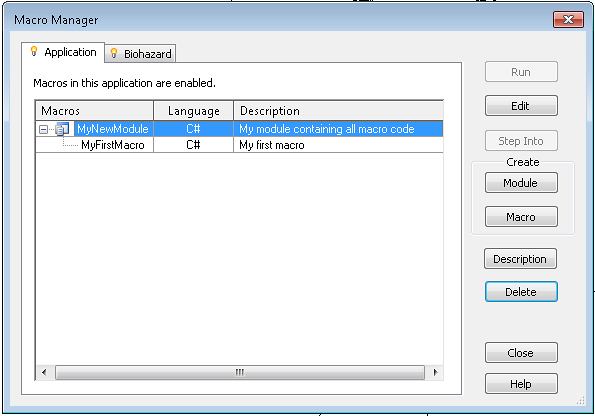
Upon restart, you should see the Public_2014 tree in your Macro Manager.

To ensure you have the latest version:
  1. Do a Fetch and Pull in SourceTree
  2. Edit one of the macros
  3. Do a Rebuild by hitting F8 - any new code or extra macros should now show up
(thanks to Troy Gates for above tip)

Note:  Make a sample macro and it will populate files and folders in:
C:\ProgramData\Autodesk\Revit\Macros\2014

You can also carefully follow the images at :
A public Git repository for sharing Revit Macros at BitBucket | Boost Your BIM - making Revit even better

Baca Selengkapnya ....

Public Macro Repository for Revit

Posted by Unknown Kamis, 10 Oktober 2013 0 komentar
If you want to submit Revit API code and macros for public review and use, check out:
https://bitbucket.org/BoostYourBIM/revit_api_public

Now, we just need someone to make an API add-in that hooks into BitBucket (somehow), and downloads and installs macros automatically into the Revit session :-)  We would essentially have an unlimited store of easily accessible plugins in an open source repository ... cool, huh?

To submit code, you should login or register for Bitbucket, then send a message to:
https://bitbucket.org/BoostYourBIM

Harry can give you write access.

Associated post:
A public Git repository for sharing Revit Macros at BitBucket | Boost Your BIM - making Revit even better

If you want to learn more about it and code sharing generally, check out
What is version control, and why should you care? | Boost Your BIM - making Revit even better


Baca Selengkapnya ....

Macros for Deleting Views and Sheets (Troy Gates)

Posted by Unknown Rabu, 09 Oktober 2013 0 komentar
Use with care!

  • Delete All Sheets and Views
  • Delete Sheets And Views (except floor & ceiling plans)
  • Delete Views (except floor and ceiling plans)

Get them at:
Revit Coaster: Macros for Deleting Views and Sheets

Baca Selengkapnya ....

Delete Imported DWGs (not links) and Other CAD files (plus How to Setup Revit Macros)

Posted by Unknown Sabtu, 09 Maret 2013 0 komentar
Boost Your BIM has been posting some awesome stuff.  One older post shows you how to quickly purge your Revit model of Imports:
a FilteredElementCollector, a bit of LINQ, a transaction, and Document.Delete to get the imports (but not the links) out of the model.

Check out the code at:
Delete Imported DWGs and Other CAD files � Boost Your BIM – making Revit even better

If you want to learn how to set-up and use macros in Revit, check out:
Setting up your Revit project for inputting macro codes - Benjamin Malone

His detailed post covers:
  • Revit Macro Manager
  • Module creation and choosing a language
  • SharpDevelop
  • Building and running the macro


Baca Selengkapnya ....
Trik SEO Terbaru support Online Shop Baju Wanita - Original design by Bamz | Copyright of android tv.